Blogs
How We Strengthened Agent and MCP Security in Nasiko
Nasiko
Notes from three weeks in the GitHub Secure Open Source Fund, and why we started treating our own agent surface as untrusted input.
Nasiko exists to help teams deploy, govern, and secure AI agents. So when we were selected for the GitHub Secure Open Source Fund, the question we could not sidestep was the obvious one: how well do we secure our own?
The program led us to tighten the standard security foundations every open-source project needs, and we did that work. But it also changed how we think about a less familiar boundary: the tools we permit AI agents to use. That second part is what we most want to pass along, so this post spends its time there.
These are notes from work in progress, not a victory lap.
The program, briefly
The GitHub Secure Open Source Fund pairs funding with three weeks of hands-on security education led by the GitHub Security Lab. We went through Session 4, which ran in late April 2026. The module on AI, LLM, and MCP security is where the idea below clicked for us. To give a sense of why GitHub emphasizes it, in its summary of the program's first two sessions, GitHub reported that 63% of participants said they left with a better understanding of AI and MCP security.
The mental model that changed for us
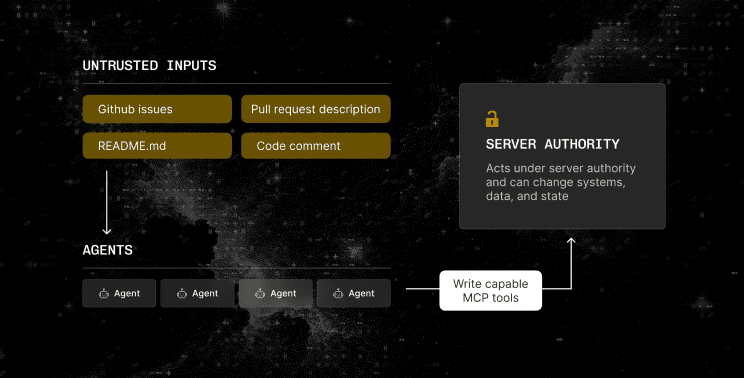
The one idea that reframed everything else is easy to state and easy to underrate. An MCP tool can act with whatever privileges its server has been granted, and once that capability is exposed to an agent, it becomes part of the attack surface shaped by the agent's inputs.
The MCP specification does define authorization, user consent, and scoped permissions. The catch is that those are optional and easy to skip, and a server that operates with its own broad privileges rather than narrow, user-bound scopes is a documented failure mode. So the safe assumption is that a tool can do whatever its server can do, until you have deliberately narrowed it.
That makes wiring up an MCP server less like adding a library and more like installing a browser extension. The interesting question is not only what the tool is meant to do, but what it is capable of doing, and under whose authority.
Prompt injection is not someone typing in a box
The second half of the lesson follows from the first. Prompt injection does not require a malicious user typing into a form. Any string an agent reads can carry an instruction: an issue body, a pull request description, a README, even a code comment pulled in from a remote source. If an agent has a mutation-capable tool and reads untrusted text, that text can try to drive the tool.
Treat remote content as untrusted input first and useful context second.
What we changed
Once we accepted that framing, the work became concrete.
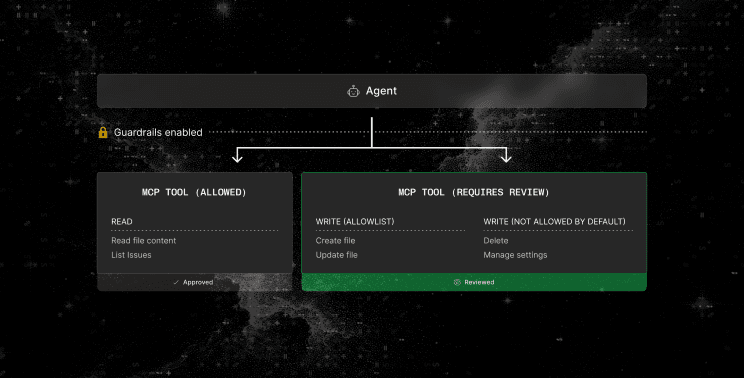
We started with an inventory. We listed the MCP tools exposed to our agent workflows and, for each one, wrote down what it could actually do rather than what we used it for. Seeing the write-capable operations in one place is what made the risk legible instead of theoretical.
We then restricted write-capable operations to an explicit allowlist, so the mutations an agent can perform are explicitly enumerated rather than inherited by default. And we adopted a read-only-by-default posture for new MCP integrations, with an explicit review before any write path opens. The point is to make "this can change things" a deliberate decision with a reviewer attached, rather than the state you drift into by not deciding.
None of these moves are exotic. What the program gave us was less a new tool than a reason to prioritize this now, a shared vocabulary for it, and a room full of people who took the risk seriously enough to make it feel worth doing properly.
The less novel work mattered too
It would be easy to make this sound like agent security replaced ordinary security engineering. It did the opposite. Most of our three weeks went into foundations, and they are the reason the MCP work rests on something solid. Three that were worth the time:
- We formalized how vulnerabilities get reported and handled before an incident, rather than improvising during one.
- We tightened the software supply chain by pinning third-party GitHub Actions to fully commit SHAs and reducing workflow token permissions to the principle of least privilege.
- We audited who had access to what and removed unnecessary permissions.
We go deeper into the supply chain and repository hardening in a follow-up post. The short version is that agent security is new, and it does not excuse skipping the basics.
AI can help with security. It is not the security gate.
We used GitHub Copilot during the program, and it was genuinely useful for cutting low-friction noise. We came out more convinced, not less, that AI suggestions do not replace static analysis or dependency scanning. Treating an assistant as a security gate creates a false sense of coverage over the very surfaces it does not watch.
So we keep the deterministic tools as the gate and let Copilot be an assistant. CodeQL and dependency scanning are where we put our trust.
Five defaults we would recommend for agent tooling
If you wire MCP servers into your own agent workflows, here is the shortest version of what we would do again, in order:
- Inventory every tool an agent can reach, and write down what each one can actually do, not just what you use it for.
- Separate read operations from mutations, and expose only the mutations an agent genuinely needs.
- Make new integrations read-only by default, with explicit review required to add write permissions.
- Treat remote content as untrusted agent input.
- Keep deterministic security tooling as the gate, and use AI assistance as another set of eyes.
This is a starting posture, not a finished standard. If you have pushed further, we would like to compare notes.
What we are testing next
We are treating the above as a baseline to build on, not a box we checked. The next questions are detection-oriented: whether known-bad-pattern detection and anomalous tool-call telemetry provide useful signals within automated agent pipelines. We do not yet know how much of that will be signal and how much will be noise, and we would rather report where we land, including what does not work, than present a finished picture we do not have.
Thanks to GitHub, the GitHub Security Lab, and the funding and ecosystem partners behind the Secure Open Source Fund. And thank you to the other maintainers in our cohort, who were generous with hard-won lessons and made three weeks of security homework feel like a shared project rather than a solo grind.
If you build with agents, we hope the five defaults save you a step. If you see a gap in how we described any of this, tell us. That is the whole point.
Read the full announcement on GitHub: https://github.blog/open-source/maintainers/what-50-open-source-projects-taught-us-about-security-in-the-ai-era/